⚡️Business Automation Unlocked: Meetings That Actually Move Work

Meetings are full of decisions, ideas, and commitments. Then everyone leaves, and… nothing happens. Notes get lost, tasks are unclear, and follow-ups depend on memory. This week’s workflow changes that. You’ll use AI meeting agents to automatically capture, structure, and route action items so work keeps moving after the call ends.
1️⃣ 🔧 Best practices for prompting
Complexity level: Beginner
AI meeting tools are only as useful as the instructions you give them. The goal is simple: turn conversations into clear, assigned, and trackable actions.
- Define what counts as an action item. Be explicit. Include decisions, next steps, owners, and deadlines.
- Separate notes from tasks. Ask the AI to clearly distinguish between discussion and action.
- Force ownership. Every task should have a named owner, not “team” or “someone”.
- Require clarification flags. If something is vague, the AI should mark it as needing clarification.
- Add a follow-up format. Specify how output should look (bullet list, table, summary email).
Common mistakes and fixes
| Mistake | Why it hurts | Quick fix |
|---|---|---|
| Asking for “meeting notes” only | Produces passive summaries with no action | Ask for “decisions, tasks, owners, deadlines” explicitly |
| Letting AI guess task owners | Leads to confusion and dropped work | Require “owner must be stated or flagged” |
| No output format defined | Results vary and are hard to reuse | Specify structured output (table or checklist) |
Example prompts you can use immediately
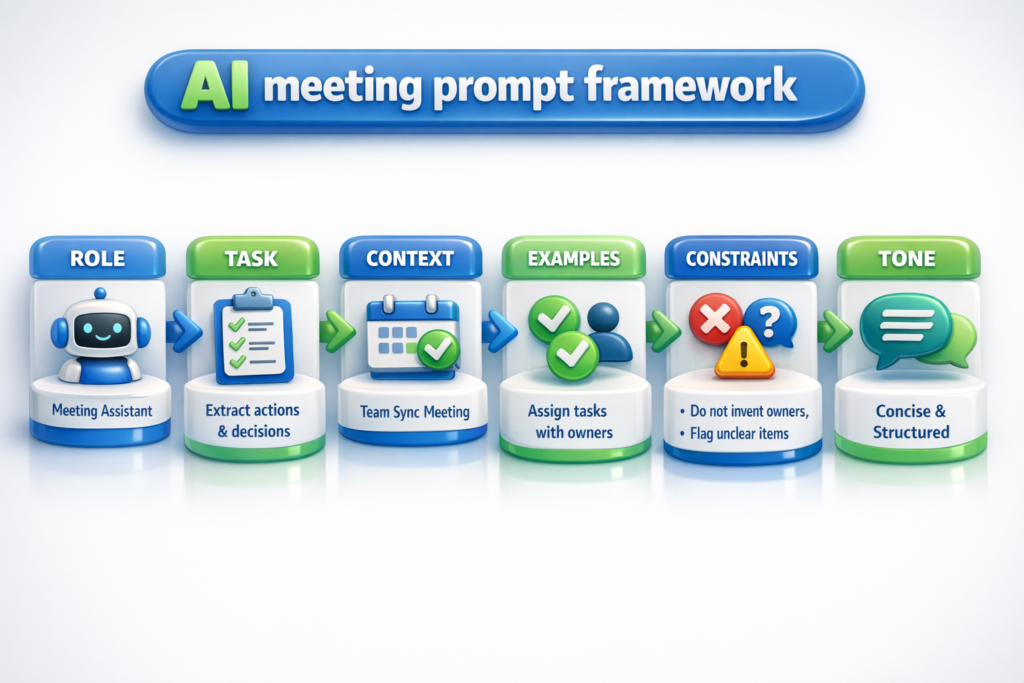
- “ROLE: Meeting assistant. TASK: Extract all decisions and action items. CONSTRAINTS: Each task must include owner and deadline or be flagged. OUTPUT: Table format.”
- “Summarize this meeting into three sections: key decisions, action items, and risks.”
- “Rewrite these notes into a follow-up email with clear next steps and assigned owners.”
- “Personal: Turn this family planning conversation into a task list with who is responsible.”
- “Identify any vague commitments and list follow-up questions needed.”
Key takeaway: Meetings create value only when actions are captured clearly and assigned immediately.
2️⃣ 🤖 Featured tool deep dive
Tools like Otter.ai and similar AI meeting agents automatically record, transcribe, and analyze conversations. They don’t just capture what was said; they structure it into usable outputs.
You connect the tool to your calendar, it joins meetings, and after the call, it generates summaries, tasks, and highlights.
Trigger → Action → Output
Meeting starts → AI records and analyzes → Tasks and summary delivered automatically
Use cases
| Role | Use case | Input → output | Level |
|---|---|---|---|
| Project manager | Sprint meeting tracking | Discussion → task list with owners and deadlines | Beginner |
| Team lead | Weekly team sync recap | Conversation → structured summary + follow-up email | Beginner |
| Operations | Cross-team coordination | Meeting notes → categorized action items by department | Beginner |
| Sales manager | Client call follow-up | Call transcript → next steps + CRM-ready notes | Beginner |
| HR partner | Interview debrief | Panel discussion → candidate evaluation summary + decisions | Beginner |
The real benefit shows up after the meeting. Less chasing people, fewer missed tasks, and clearer accountability across teams.
Key takeaway: AI meeting agents turn passive conversations into active workflows.
3️⃣ 🧩 What AI can do for you (by function)
| Function | Task | Input → output |
|---|---|---|
| Operations | Track cross-team actions | Meeting transcript → categorized task list |
| Support | Capture escalation items | Support call → issue summary + next steps |
| Admin | Create follow-up emails | Notes → polished email with actions |
| Marketing | Extract campaign tasks | Brainstorm session → prioritized action plan |
| Sales | Log client commitments | Call → CRM-ready summary + tasks |
| Creative | Turn ideas into deliverables | Discussion → task board outline |
| HR/L&D | Document decisions | Meeting → decision log + assigned actions |
Key takeaway: AI bridges the gap between talking and doing.
4️⃣ 📆 Tips for everyday tasks
| Who it’s for | Tip (with one emoji) | Tiny prompt |
|---|---|---|
| Team leads | End meetings with clarity ✅ | “List all action items with owners and deadlines.” |
| Project managers | Spot missing ownership 🔍 | “Flag any tasks without a clear owner.” |
| Anyone | Turn notes into emails ✉️ | “Convert these notes into a follow-up email.” |
| Busy professionals | Capture quick decisions ⚡ | “Extract decisions and next steps from this transcript.” |
Key takeaway: Small prompt tweaks can turn messy notes into structured action in minutes.
5️⃣ 🧭 Which tool to use & when — decision table
| Task | Tool | Why | Level |
|---|---|---|---|
| Record and transcribe meetings | Otter.ai | Automatic capture and transcription | Beginner |
| Generate structured summaries | ChatGPT | Flexible formatting and rewriting | Beginner |
| Track tasks from meetings | Asana | Converts actions into trackable tasks | Beginner |
| Sync notes with calendar | Microsoft Teams + Copilot | Integrated meeting intelligence | Beginner |
| Automate follow-ups | Zapier | Connects meeting outputs to email or task tools | Intermediate |
| Store meeting knowledge | Notion AI | Centralized and searchable notes | Beginner |
6️⃣ 🧱 One AI myth holding businesses back
Myth: “Meeting productivity is about better agendas.”
Agendas help, but they don’t solve the real issue. The problem is what happens after the meeting. Without clear action capture, even the best meeting goes nowhere.
Example
- Old way: Great discussion → vague notes → forgotten tasks
- New way: AI extracts actions → assigns owners → sends follow-up instantly
Truth: Meetings improve when follow-through is automated, not just planned.
7️⃣ 💼 One costly C-level mistake (and a fix)
Mistake: Leaders assume teams are tracking their own follow-ups consistently.
In reality, task tracking varies wildly. Some teams document everything, others rely on memory. This creates misalignment, delays, and duplicated work.
Fix
- Standardize meeting outputs across teams
- Use AI meeting agents to capture every session
- Auto-generate task lists and assign owners
- Push tasks into a shared system (Asana, Planner)
- Review action completion weekly
Bold takeaway: Consistency in follow-up systems matters more than meeting quality.
8️⃣ 🔭 What’s next
Next week we’ll explore how AI is being used to automatically clean and update CRM data from emails and calls.
Prep idea: save three recent email threads where information had to be manually entered into a system.
9️⃣ ❓ Question of the day
What percentage of your meetings actually result in clearly assigned next steps?
🔟 📣 Call to action
Pick one recurring meeting this week and use an AI tool to generate and share structured action items immediately after it ends.
⚡️Stay curious, stay sparky!

Dr. Alaa Alsarhan is a higher education leader and analytics expert specializing in assessment, learning outcomes, and data-informed decision-making. He is CEO & Co-Founder of Horizons Analytics, a consultancy advancing AI-powered assessment and strategic planning in education and business. Dr. Alsarhan has authored multiple publications, delivered national keynotes, and led innovative research on high-impact practices, student success, and AI in higher education. He is a founding member of the GenAI in Higher Education Assessment Community of Practice and a fellow with the NWCCU Mission Fulfillment and Sustainability program.
View All Articles